
The skill that worked, until it didn’t
The most expensive AI failure is the one that returns a confident, clean, and correct outcome, every time.
I built a skill in Copilot in SharePoint called Ask Formulary Agent. It answers questions about a pharmacy formulary drug library: which drugs need prior authorization in a given state, which documents sit in a given coverage tier, how step therapy compares across products. It had worked well in demos for weeks.
Then I asked it a simple question: show me the documents with coverage tier T3NPB. T3NPB is shorthand that people on the business side use every day for Tier 3 – Non-Preferred Brand. The skill’s first pass came back with nothing. Six matching documents were sitting in the library the whole time.
In this scenario T3NPB is a synonym / alias that business users refer, and it is not found in the content or the metadata. So, I created a SharePoint list with mapping between alias, such as T3NPB to ‘Tier 3 - Non-Preferred Brand’
What is a Skill, and why the quality matters?
Skills are how organizations are turning Copilot from a general assistant into a repeatable business process. A skill packages expertise, the steps, rules and data sources a task needs, so anyone on the team gets the same quality of answer an expert would give.
That is exactly why skill quality matters at the leadership level:
-- Skills scale decisions. One flawed instruction is repeated by every user, every day, at machine speed.
-- Skills encode institutional knowledge. Shorthand like T3NPB is how real people talk. A skill that only understands the formal label fails the people it was built for.
-- Skills run on models that keep changing. The model under your skill today will not be the model under it next quarter. Behavior that held yesterday is not guaranteed tomorrow.
Building a skill is the easy part. Keeping it accurate, efficient and trustworthy over time is where the business value is won or lost.
The business pain points hiding inside “working” Skill
When I traced the T3NPB miss, the cause was mundane. The skill resolved aliases through a synonym list, but it trusted the schema’s “Metadata field” column. In that row, the column was blank; the real mapping sat in a different populated field. The skill read the blank as “no mapping exists” and moved on.
Every enterprise skill has its own version of this. Here is what it costs the business.
-- Silent wrong answers erode trust. A user who gets an empty result assumes the data is not there. They make a decision on that, or they stop using the tool. Either outcome kills adoption.
-- Edge cases are where the real work lives. Happy-path demos use formal labels. Real users type abbreviations, lowercase codes, typos and values that do not exist. A skill tested only on the happy path is untested.
-- Model drift is invisible without a baseline. When the underlying model is upgraded, a skill can get better or quietly worse. Without a defined set of tests, there is no way to know which, until a customer or auditor finds out first.
-- Inefficient skills burn tokens and time. A skill that misses on the first pass retries, re-queries and backtracks. That is wasted compute and wasted user patience. Token efficiency is an architectural discipline, not a cost afterthought.
-- Manual tuning does not scale. Most teams fix a prompt by editing it, trying one example, and hoping. That is not engineering. It is guessing with extra steps.
For regulated content like a drug formulary, the stakes are higher still. A missed prior-authorization requirement is not an inconvenience. It is a compliance and patient-access risk.
The solution: Improve Skill, with evals at its core
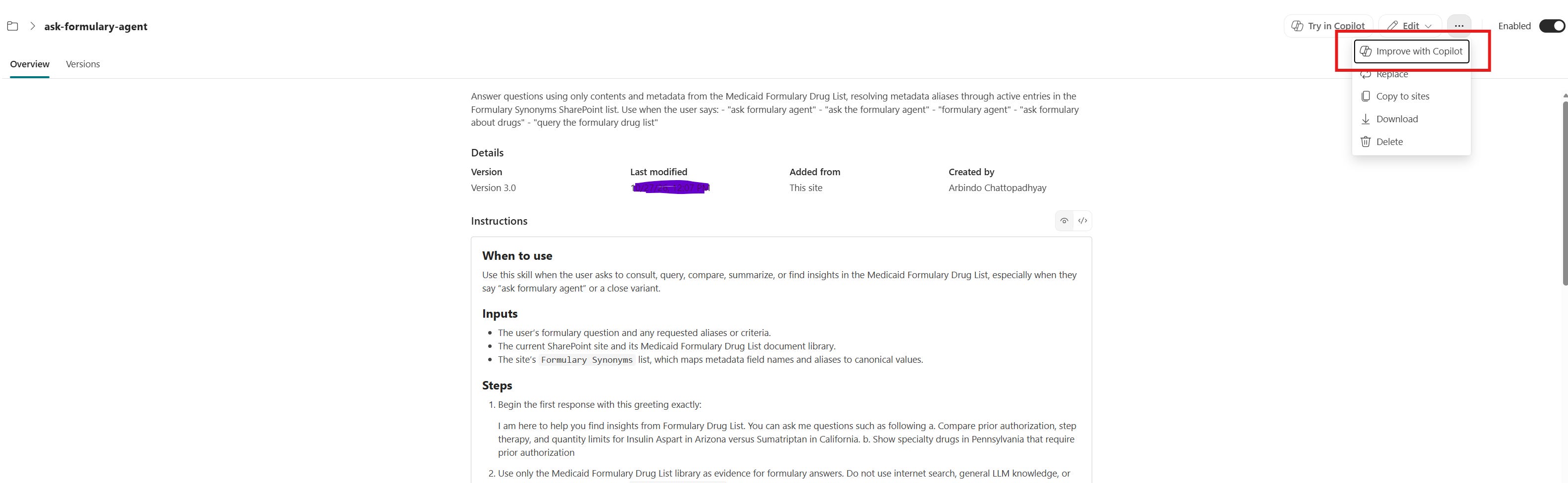
Copilot in SharePoint now includes a built-in capability to improve an existing skill. Instead of hand-editing instructions and hoping, you ask Copilot to diagnose a failure, propose a fix, and prove the fix works before anything is saved.
The proof comes from evals. Evals are test cases that define what a correct outcome looks like, written down before the change is made. Each one is binary: pass or fail. No “mostly right.”
A good eval set has two parts:
-- Test inputs that cover the happy path, the edge cases and the adversarial cases. Real users, not demo users.
-- Eval criteria that state exactly what passing means. For example: pass if the agent confirms the mapping from populated row data before filtering; fail if it relies on a blank field.
Improve Skill then runs a disciplined loop. It measures a baseline on the current skill, applies one change (a “mutation”), re-runs every test several times, and keeps the change only if the score improves with no regressions. It stops when the results are consistently high, or when changes stop helping.
This is the shift that matters for leaders. The eval set becomes a durable asset. Models change, instructions change, data changes. The evals are how you know, every time, that the outcome still matches the expectation.
Step by step: how I improved Ask Formulary Agent
The whole process took one conversation. Here is exactly what happened.
Step 1: Catch the failure in real use
I ran the skill with a real query: Show me list of documents with coverage tier T3NPB. The first lookup missed the synonym. On a second pass, Copilot recognized that the value was stored under a different column, mapped T3NPB to Tier 3 – Non-Preferred Brand, and found six documents: Metformin HCl (Ohio), Lisinopril (Texas), Gabapentin (Arizona), Ezetimibe (Illinois), Finasteride (Rhode Island) and Methotrexate (Georgia).
The answer was right in the end. That is the signal to improve the skill, not just accept the result.
Step 2: Ask Copilot to diagnose and recommend
I asked one plain question: would you recommend any change to my skill so you don’t miss the synonym lookup?
Copilot proposed a specific rule: before filtering, verify the synonym row’s actual populated fields. If the schema-selected “Metadata field” column is blank, find the populated field in the same record. Apply the alias only after confirming its metadata field, canonical value and active status.
Step 3: Define the evals before changing anything
Copilot loaded the skill and proposed a starter test package for me to approve.
Four test inputs:
Happy path: “Show me documents with coverage tier T3NPB”
Happy path: “List documents with coverage tier Non-Preferred Brand”
Edge case: “Show documents with coverage tier t3npb” (checks case-insensitive matching)
Adversarial: “Show documents with coverage tier NOT-A-REAL-TIER” (checks that an unmapped alias is not silently treated as valid)
Four binary eval criteria:
-- Row value verified: the agent confirms the mapping from populated row data, not a blank schema field.
-- Active mapping only: it uses only active alias mappings for the requested field.
-- Correct results: it filters by the resolved canonical value and reports every match.
-- Unmapped alias handled: it reports that no mapping exists and asks how to proceed, instead of inventing results.
The adversarial case is the one most teams skip. It is also the one that protects you from confident fabrication.
Step 4: Set a budget and stop rules
Copilot proposed guardrails so the optimization could not run forever: 3 runs per change, up to 8 rounds. It would stop early after 3 consecutive discards on the same eval, 2 consecutive changes that scored below baseline, or two rounds in a row at 90% or higher. I replied “proceed.”
Step 5: Measure the baseline
The original skill was scored against all four inputs, three runs each, across the four criteria: 36 checks in total.
Baseline: 3 of 36, or 8%. Three of the four inputs returned zero matches. The adversarial input returned no matches but never told the user the alias was unrecognized.
Step 6: Apply one change and re-test
Round 1 added the populated-row verification rule. Every input was re-run three times.
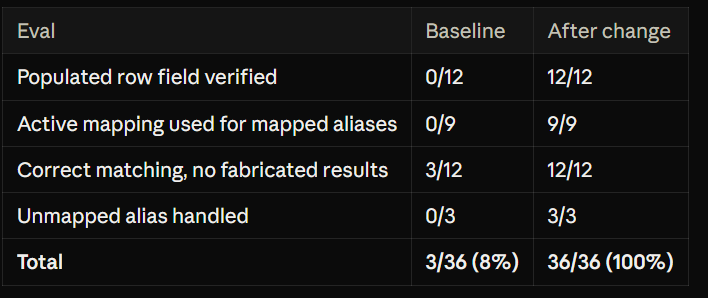
No regressions. Decision: keep.
Step 7: Confirm stability
Round 2 repeated the same tests against the unchanged candidate. Same result: 36/36, no regressions. Two consecutive rounds at 90% or higher triggered the stop rule. Total: 2 experiments, 2 kept, 0 discarded, +92 percentage points.
One note on rigor: these runs were simulations, scored against ground truth from the real lookup and the inspected synonym rows, not 36 fresh live queries. The improvement loop was transparent about that, which is exactly the kind of honesty you want from an evaluation tool.
Step 8: Review the diff and save
Copilot showed the exact change to the skill. Check the actual synonym-row values. If the “Metadata field” is blank, inspect other populated fields in that row, and use them only when they unambiguously identify the field. Never infer a mapping from the alias or the likely result. If it stays ambiguous, say so and do not filter on an assumption.
I was given three options: overwrite the skill, save as a new version (ask-formulary-agent-v2), or discard. I chose overwrite. The site skill was updated in place, and every user of it benefits immediately.
What this means for the business
Each pain point maps to something the Improve Skill loop directly addresses.
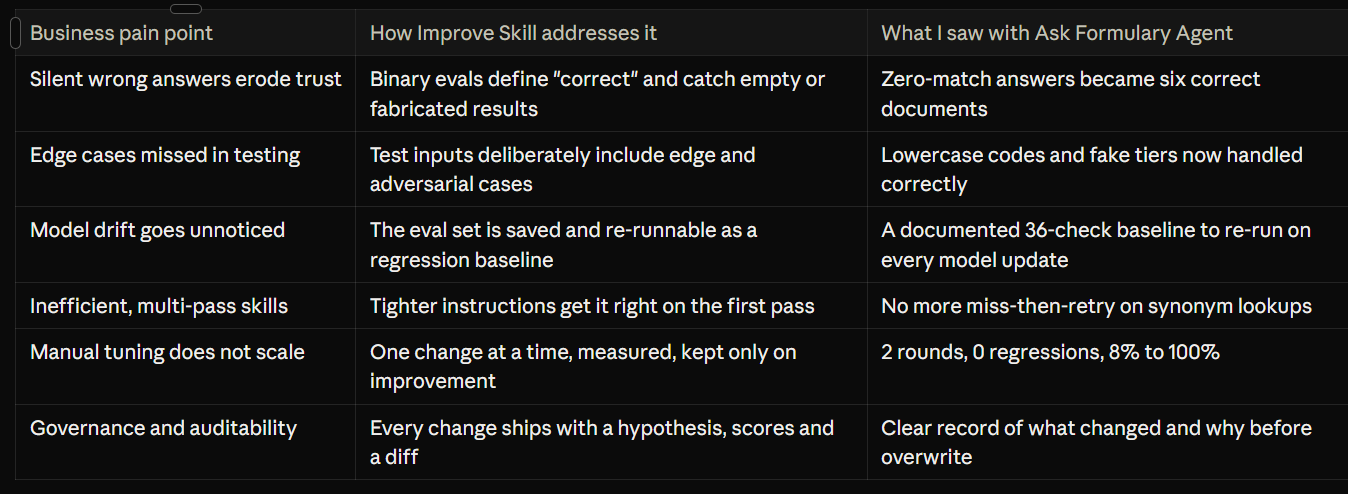
Three things stand out for decision makers.
First, quality becomes measurable. “The agent seems fine” is not a standard you would accept from any other business system. A pass rate against defined evals is.
Second, the people closest to the work can improve the AI. I did not write code or open a developer tool. I asked questions in plain language, approved a test plan and chose to overwrite. Domain experts can own skill quality, not just IT.
Third, the investment compounds. A skill improved once is fixed once. A skill with an eval set can be re-verified every time the model, the data or the instructions change. That is how an AI capability becomes a durable advantage instead of a demo.
Where to start this week
You do not need a program office to begin. Pick one skill and run this playbook.
Choose your highest-traffic skill. The one more people rely on than you would like to admit.
Collect three real failures or near misses. Shorthand, abbreviations and “no results” answers are the richest source.
Write four to six evals before changing anything. Include at least one edge case and one adversarial case. Keep every criterion binary.
Run Improve Skill. Let it measure the baseline, test one change at a time and show you the diff.
Save the eval set as an asset. Re-run it whenever the model, the data or the skill instructions change.
Report the pass rate. Put it next to adoption numbers in your AI reviews. What gets measured gets trusted.
I write regularly about putting agentic AI and Copilot in SharePoint to work in real enterprises: what I build, what breaks and how I fix it.
Subscribe so the next practitioner walkthrough lands in your inbox, and share this post with the person on your team who owns your AI skills.