
Somewhere in your organization right now, there’s a document that could cost you millions.
It might be an email thread buried in a departed employee’s inbox. A contract saved to a shared drive with no retention tag. A customer record sitting in a system no one has audited in years.
The challenge isn’t that these documents exist. It’s that no one knows what they are, how long they should be kept, or when they should be destroyed.
Consider the stakes. GDPR enforcement actions continued their upward trajectory. And beyond the fines, organizations faced litigation holds that froze operations, discovery processes that consumed thousands of staff hours, and reputational damage that eroded customer trust.
At the root of many of these failures sits a deceptively simple problem: organizations cannot comply with retention requirements for documents they haven’t properly classified.
This isn’t a technology problem in the traditional sense. It’s a business risk problem masquerading as an administrative task. And for decision-makers navigating an increasingly complex regulatory landscape, understanding why document classification matters, and how artificial intelligence is transforming the solution, has become essential knowledge.
In this post we will look at how Knowledge Agent, currently in public preview, help mitigate this risk by deploying AI to classify documents and using Microsoft Purview’s auto apply policies that assigns a retention label based on the classification.
The Foundation: Why Classification Drives Everything
Before exploring how artificial intelligence transforms document management, it’s worth pausing on a fundamental question: why does classification matter so much in the first place?
The answer lies in understanding what retention policies require.
Every regulatory framework that governs document retention operates on the same basic principle: different types of information carry different obligations.
· A routine internal memo might require retention for one year.
· An employment record might require seven.
· A contract might require preservation for the duration of a relationship plus a statutory period afterward.
· Medical records, financial statements, intellectual property documentation, customer data, each category carries specific requirements that vary by jurisdiction, industry, and context.
Retention policies translate these requirements into actionable rules. They specify how long each document type must be kept, under what conditions it must be stored, who may access it, and when it may be destroyed.
Well-designed retention policies protect organizations by ensuring that required records remain available while unnecessary data doesn’t accumulate into liability.
But here’s the critical point: retention policies can be applied manually by a user or can be automated only if the documents have been classified.
An unclassified document exists in a compliance vacuum. No retention rule governs it because
· No one has determined which rule should apply.
· It cannot be defensibly destroyed because no one can confirm its retention period has expired.
· It cannot be reliably produced in discovery because no one can locate it through policy-based searches.
· It sits in storage, accumulating cost and risk, contributing nothing to compliance objectives.
Classification is the bridge between regulatory requirements and operational reality. It transforms abstract policy into concrete action. Without accurate, consistent, comprehensive classification, retention policies become theoretical documents that describe what should happen rather than operational controls that ensure it does.
· Organizations with strong classification practices can demonstrate defensible retention, respond efficiently to regulatory inquiries, and manage data as a strategic asset.
· Organizations with weak classification practices face the opposite: indefensible practices, scrambled responses, and data that functions primarily as accumulated liability.
The question, then, is not whether classification matters. The question is how to achieve it on a scale.
The Role of AI in Document Classification
Just as Artificial intelligence is transforming every aspect of business, so it is transforming classification of document. What required months of implementation now deploys in weeks.
Microsoft Purview offers several automated classification methods:
1. Classification based on Sensitive Information Types
3. Exact Data Match Classification
4. Metadata-based classification
In this post we will explore metadata-based classification approach (#4).
This approach leverages a document metadata to apply a retention policy. For instance, applying a 7 years retention policy to documents that have a metadata Contract as document type.
Using Knowledge Agent in M365 Copilot For Document Classification
The new Knowledge Agent, part of Microsoft 365 Copilot, helps automatically tag documents based on the content of the document. Because the agent uses LLM, we have ability to influence the application of the tag using prompting.
In this scenario, we will use Knowledge Agent to automatically classify various marketing related documents for Zava Corporation.
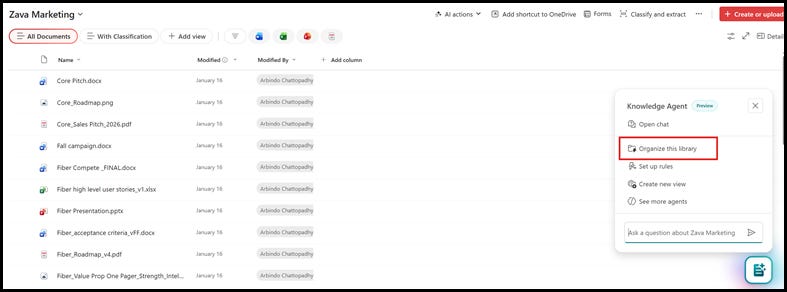
1. After you have enabled Knowledge Agent in your M365 tenant, navigate to the document library, and click on the icon on the bottom right of the screen. Next click on the Organize this library menu.
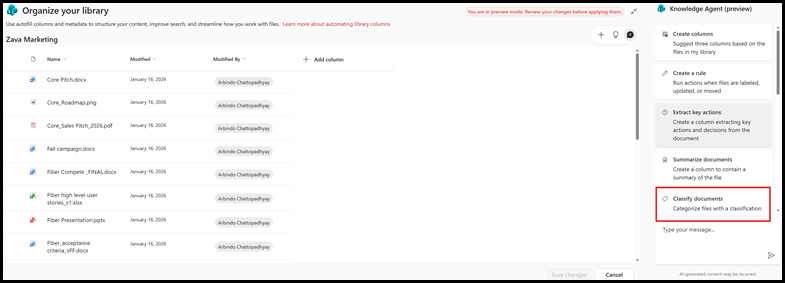
1. Classify documents
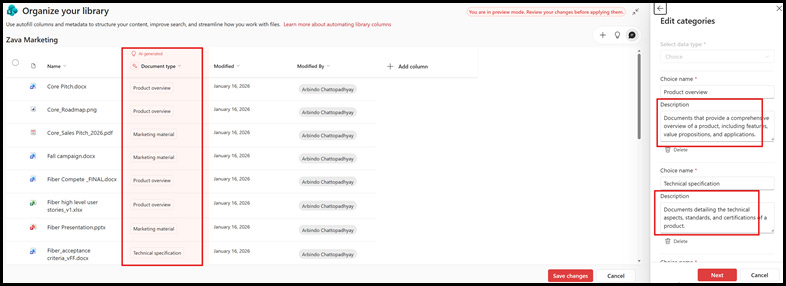
2. Review and update classification definitions
3. Documents are not classified. New documents uploaded will automatically get classified based on the definition. We can include a human in the loop workflow, to ensure that the AI assigned classification is validated and updated if necessary.
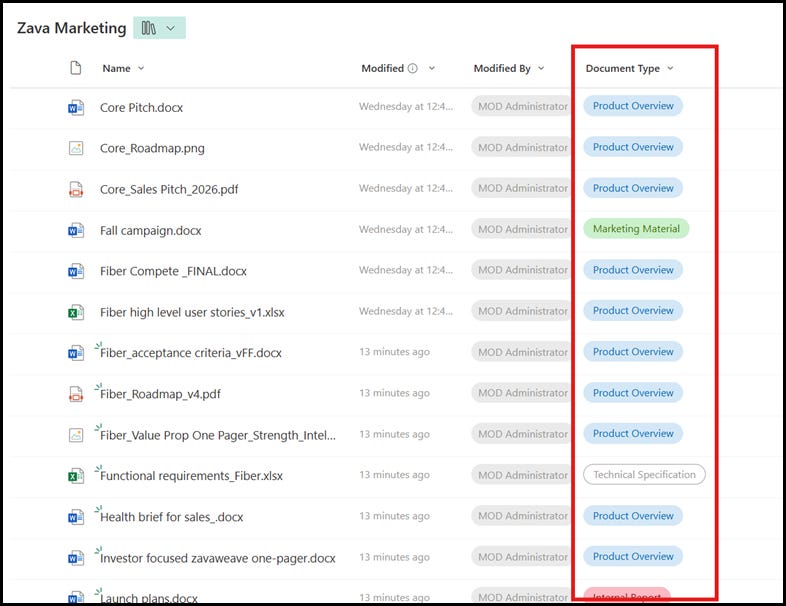
Now we have a document library equipped with an agent that automatically classifies documents as they are uploaded and created.
This classification not only helps with compliance, as we will explore more in the post, but also with other aspects of content management, such as findability and process automation.
Configuring managed property in SharePoint admin center
In the previous section, we created a new column named Document Type in the document library. This column contains the classification for the document. In this section, we will create a managed property, which is needed to automatically apply the retention policy.
Detailed steps for configuring a managed property is described in this article.
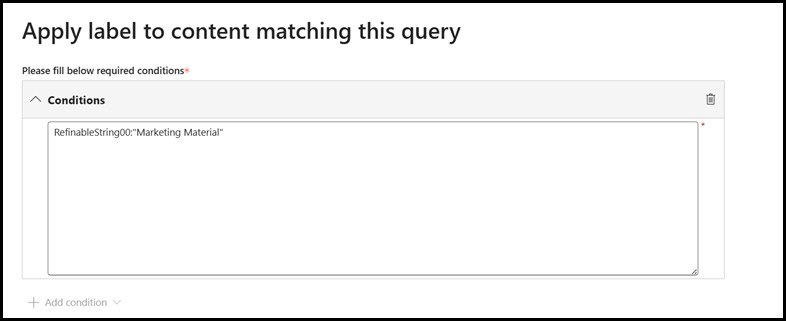
We will configure the managed property named RefinableString00, mapped to the crawled property ows_Document_Type
Auto application of retention policy based on documentation classification
In this section, we will explore how the auto-apply label policy in Microsoft Purview can be leveraged to apply a retention label to documents that are classified as Marketing Material
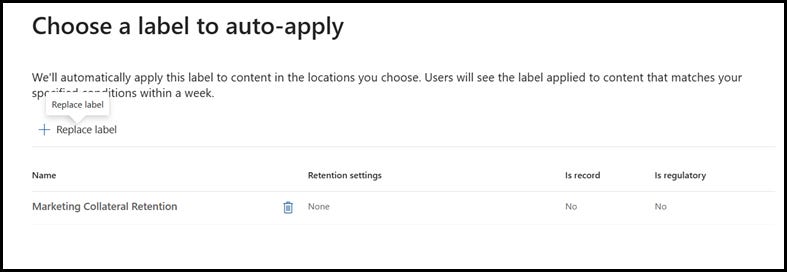
We will assume that we have a record retention label named Marketing Collateral Retention. This label has a 7 years retention policy. In the steps below we will configure the metadata-based auto apply policy to apply Marketing Collateral Retention label to documents classified as Marketing Material
1. Navigate to Microsoft Purview admin center -> Policies -> Label Policies
2. Create a new Auto-Apply policy
After you provide name and description for this policy, click Next. In this page, select Apply label to content that contains specific words, or phrases or properties
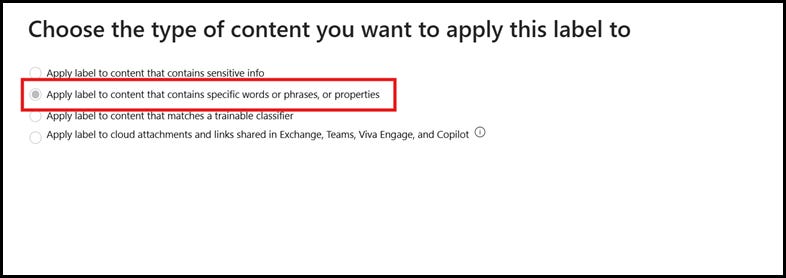
1. Next, we will specify the conditions in the policy that scans documents that are tagged with Marketing Material
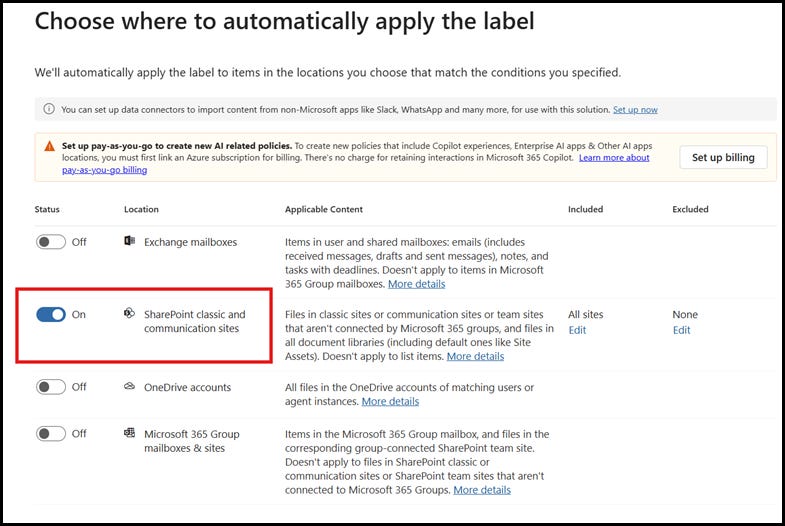
2. Next, we will select the policy to be applied to content in SharePoint sites.
3. Finally, we will select the retention label that needs to be applied to the documents and activate the policy
For step-by-step detailed guidance, refer to Microsoft documentation.
Brining it all together
Task of classifying documents manually, which is time consuming and error prone is now automated by AI with Knowledge Agent in M365 Copilot. As the policy runs in the background, any new and existing documents will automatically be assigned to a retention label based on the document classification.
Aligning AI Classification with Business Imperatives
Technology capabilities matter only insofar as they address real business needs. For AI-powered document classification, the alignment between capability and requirement is remarkably direct.
The speed is imperative. Business moves faster than manual classification can follow. By the time a human review team works through a backlog, new documents have accumulated that dwarf their progress. AI classification operates at the speed of document creation.
The scale requirement. Enterprise data volumes have exceeded any realistic manual management capacity. Organizations that once measured document holdings in millions now count in billions. AI classification scales horizontally without proportional cost increases.
The consistency mandate. Regulators and litigators don’t accept “we classified most documents correctly most of the time” as a defense. Compliance requires demonstrable, consistent application of retention policies across the entire document population. AI delivers this consistency inherently.
The resource reallocation opportunity. Perhaps most importantly for business leaders, AI classification frees human expertise for work that requires human judgment. Compliance professionals who once spent their days manually tagging documents can instead focus on policy development, risk assessment, regulatory interpretation, and strategic planning.
The business case isn’t subtle. Organizations that adopt AI classification achieve better compliance outcomes at lower cost while redeploying skilled staff to higher-value activities. Organizations that don’t continue fighting a battle that mathematics guarantees they will lose.
Things To Consider
The following are few points to keep in mind as you think about implementation:
1. The Knowledge Agent is in preview at the time of this writing. Product feature may change by the time it is GA.
As demonstrated in the post, the agent today works on an individual document library. I understand that enterprises may have a need to apply the classification across multiple SharePoint sites and libraries.
If this analysis resonated with your compliance challenges, subscribe for more insights on how technology is reshaping enterprise risk and regulatory strategy. Share with colleagues who are navigating these same challenges.